This page describes how to import data into electronic Case Report Forms (eCRFs) using CDISC ODM XML or tabular formats.
 Notes:
- You can upload file attachments (e.g., PDF) for import, but it must be done with the OpenClinica API. It is not possible to import files via the Import CRF Data screen. For more information, refer to Clinicaldata (Import and Retrieve Clinical Data).
- You cannot import into a Events or Forms that have a status of Locked, Archived, or Removed. If data for a Participant is imported into Events or Forms, the status of the Participant will be Available.
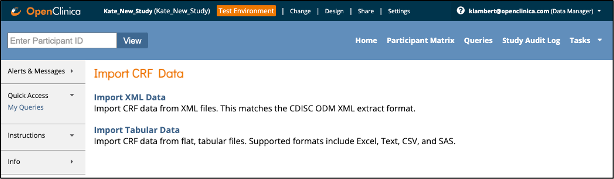
To Access the Import Data Screens:
- Click Tasks in the Study Runner header row.
- Select Import Data.
- Choose either:
- Import XML CRF Data, or
- Import Tabular Data
Creating an Event Scheduling File:
- Open Excel and create a new file.
- Add the following column headings:
- Participant ID
- StudyEventOID
- StartDate
- In the Participant ID column, enter each Participant OID.
- In the StudyEventOID column, enter each Event OID.
- In the StartDate column, enter the start date of each Event in YYYY-MM-DD format.
- Save the file as a CSV file.
 The CSV file is specific to each site, so the Participant List in the file must match the Participant List at the site.
For Information on Importing Data, See the Following Sections:
Was this article helpful?
That’s Great!
Thank you for your feedback
Sorry! We couldn't be helpful
Thank you for your feedback
Feedback sent
We appreciate your effort and will try to fix the article